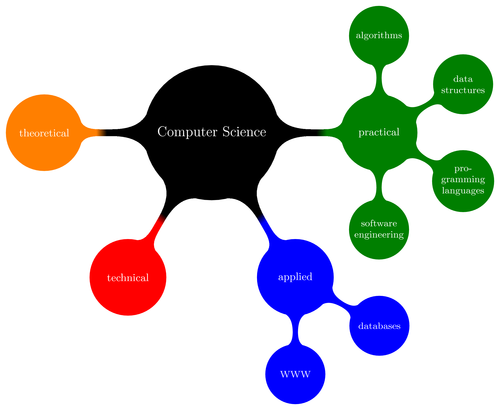


Version 1.09 of PGF/TikZ added a library for drawing mindmaps. Here's an example from the manual.
Download as: [PDF] [TEX] • [Open in writeLaTeX]
Do you have a question regarding this example, TikZ or LaTeX in general? Just ask in the LaTeX Forum.
% Author: Till Tantau
% Source: The PGF/TikZ manual
\documentclass{article}
\usepackage{tikz}
\usetikzlibrary{mindmap,trees}
\begin{document}
\pagestyle{empty}
\begin{tikzpicture}
\path[mindmap,concept color=black,text=white]
node[concept] {Computer Science}
[clockwise from=0]
child[concept color=green!50!black] {
node[concept] {practical}
[clockwise from=90]
child { node[concept] {algorithms} }
child { node[concept] {data structures} }
child { node[concept] {pro\-gramming languages} }
child { node[concept] {software engineer\-ing} }
}
child[concept color=blue] {
node[concept] {applied}
[clockwise from=-30]
child { node[concept] {databases} }
child { node[concept] {WWW} }
}
child[concept color=red] { node[concept] {technical} }
child[concept color=orange] { node[concept] {theoretical} };
\end{tikzpicture}\end{document}
Comments
Really good. The best technologies for powering LaTeX. I'm a new user of this extended language. When I tryed for fisrt time, I hope that LaTeX was so complicated for making a simple Didactic File, but at this time, I'm very satisfied on trying it. (sorry for my ugly english)
Is there any quiz that you can design for reading the "mindmap(s)".--Deatiled interpretation? Have done 4 yrs Java,Msoft common tests..can negotiate by email.only email
Hi, Thanks for this examples. I'm having a rendering problem with the Debian squeeze/sid package. If you download the PDF file for this example you'll see what I mean as this is exactly what I'm experiencing. Anybody know how to fix this?
Thanks, Oscar.
all humna being are equal be for the law
Hi,
this example is great - thanks a lot!
However, is there a way to slightly change the size of the resulting output? I am using "beamer" and the plot i have generated is just a little bit bigger than the slide. Can one "scale" it down?
Thanks.
@Oscar Morante: Try to use ps2latex+ps2pdf for good results. Using pdflatex seems to be responsible for those rendering errors.
Regarding scaling the output. I generate a PDF page. Then include it in my LaTeX source using the following example for file yourMindMap.pdf: \includegraphics[viewport=20 20 500 500, clip=true, keepaspectratio, scale=0.5, angle=0]{yourMindMap.pdf}
The arguments to viewport are in points (use length of PDF page in inches times 72 to get points) and mean respectively: the distance from left border, the distance from the bottom edge, then the width, and finally the height you want shown in your document. When you show an eps file these coordinates will count for the bounding box, otherwise they count for the whole page or image like for jpg (no bounding box).
Aw, this was a very nice post. In thought I would for instance to put in writing like this moreover – taking time and precise effort to make an first-class article… but what can I say… I procrastinate alot and under no situation appear to get something done.
Post a comment